

Searching for the best crypto wallet for beginners drops you straight into a wall of jargon: cold storage, air-gapped signing, derivation paths. Here's the short answer. The best beginner wallet is a hardware wallet with a recovery system that survives normal human mistakes, and you can judge that for yourself with four plain questions. We make one (the Ryder One), so you know where we stand. Instead of opening with a pitch, we'll hand you the same four tests we'd give a family member, because a wallet you understand beats a wallet you were talked into.
What the best crypto wallet for beginners needs to get right
Every wallet decision comes down to four questions, and most of the jargon you'll meet is a noisy version of one of them. Miss one and you'll feel it later, usually at the worst moment.
1. Security you can verify
Anyone can claim their product is secure. What you want is proof: an independent audit by a named security firm with the report published where you can read it, plus a certified secure element chip, the same class of hardware that guards passports and bank cards. If a company won't show its homework, treat the silence as your answer.
2. Recovery that survives real life
Before you buy anything, ask how you'd get your crypto back if the device were lost, stolen, or run through the washing machine. Most wallets answer with a seed phrase: a list of 12 or 24 words that restores everything, which you must write down, hide well, and protect for as long as you own crypto. The system works until life happens, and life includes house moves, floods, curious visitors, and plain forgetfulness.
3. Setup you can finish
A wallet only protects you once it's fully set up, and abandoned setups are more common than the industry admits. Long manuals, firmware updates, and browser extensions raise the odds that the box ends up in a drawer while your coins stay wherever they were. Look for a setup measured in minutes and guided step by step on the device or your phone.
4. Support for the coins you hold
Check that a wallet covers what you own now and what you're likely to buy next. For most beginners that means Bitcoin, Ethereum, Solana, and the popular tokens built on those networks; a wallet that handles those chains well beats one advertising 5,000 assets you'll never touch.
Option 1: leaving your crypto on an exchange
Most people start by buying coins on a crypto exchange and leaving them there, because it feels like online banking. The catch sits underneath: the exchange holds the private key, the secret code that controls the coins, which means you hold a promise rather than the asset itself.
The record on that promise is grim. When FTX failed in November 2022, the CFTC's complaint put customer losses at more than 8 billion USD, much of it belonging to everyday depositors who believed their balance was theirs. Exchanges also freeze withdrawals during market panic and can go bankrupt, and in each case your money waits behind someone else's decisions.
Measured against the four tests, an exchange fails the one that matters most: there's nothing for you to recover, because you never held the keys. Buying on an exchange is fine; storing there long term is the risk.
Option 2: a mobile hot wallet
A hot wallet is a free app that keeps the keys on your phone, and it gives you self-custody, meaning you hold the keys yourself. For small amounts you spend often, it's a reasonable tool. The trouble is exposure: your phone is online all day, and every phishing link, fake app, and clipboard trick on the internet can reach the same device your money lives on. Hot wallets also lean on a seed phrase for recovery, so the burden from test two lands on you in full, without the protections that offline hardware adds.
Option 3: a hardware wallet
A hardware wallet keeps your keys on a dedicated offline device, so malware on your phone or laptop can't reach them. This is the category we'd point any beginner toward, and it's where the Ryder One competes, so two fair notes about the established names belong here.
Ledger and Trezor are the veterans, and both build capable devices with long track records. Both still hand you a seed phrase at setup and make you responsible for guarding it for the life of the wallet, so the recovery burden from test two doesn't go away; it moves onto a piece of paper (our TapSafe Recovery was built to close that exact gap, and we'll get to it below). Worth knowing too: in 2020, Ledger confirmed that a breach of its marketing database exposed around a million customer email addresses, along with home addresses for thousands of buyers. No funds were touched and the devices stayed secure, yet many of those customers spent years fielding phishing attempts afterward. None of that means avoiding hardware wallets; it means judging each company on how it handles your data as well as your keys.
How the Ryder One measures up
We built the Ryder One for the person this article is written for, so here's how it scores on the same tests.
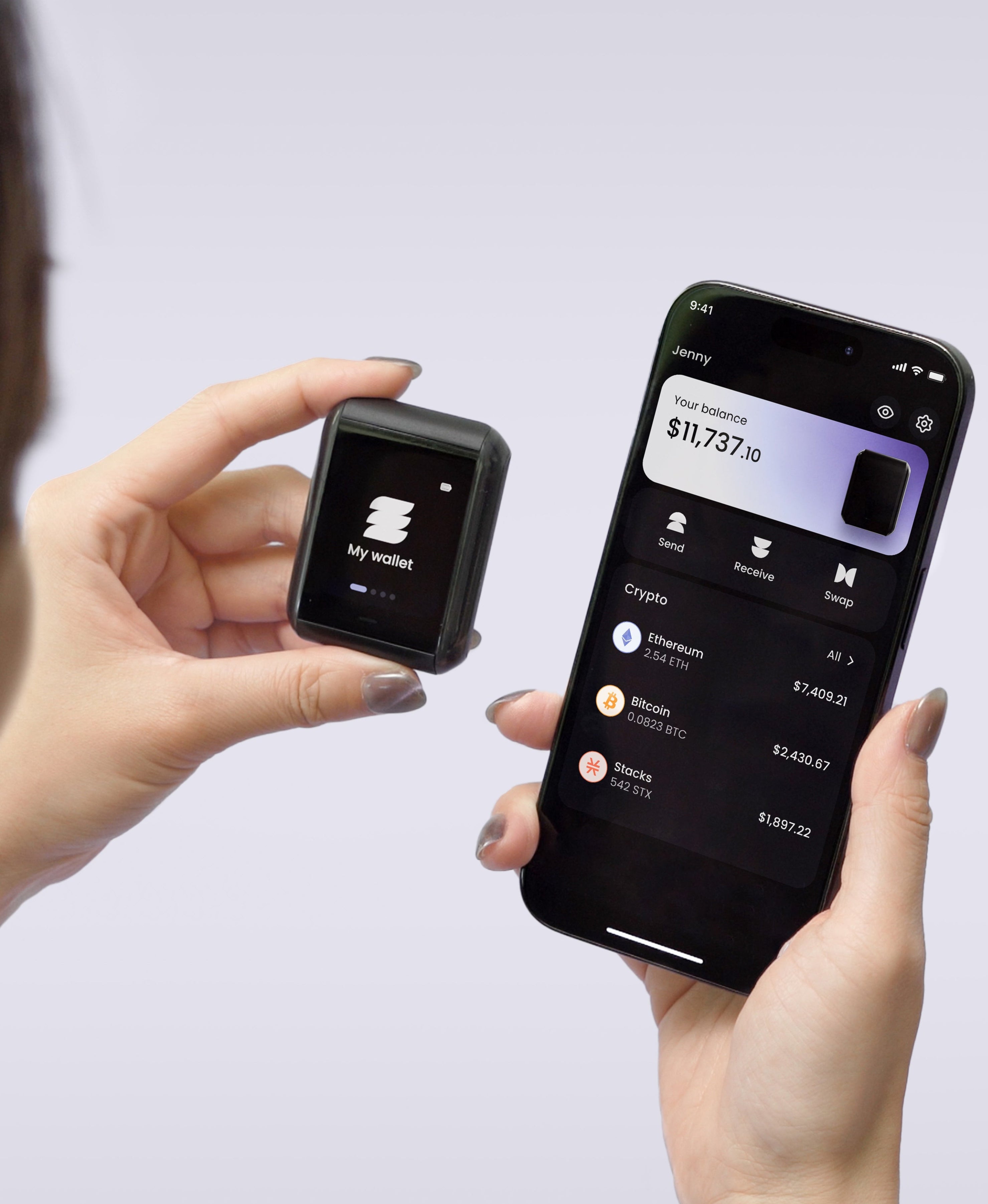
Security first. Halborn, one of the most respected blockchain security firms, audited our firmware and found zero critical and zero high-severity issues, with the full report public. Keys are generated inside an EAL6+ certified secure element and never leave it. The device is NFC-only, with no USB, Bluetooth, or WiFi, so the only way to talk to it is a physical tap, and every transaction shows on the 1.6-inch screen for you to verify before anything signs.
Setup takes three NFC taps and finishes in under 60 seconds, guided on the device itself. For coins, the wallet supports Bitcoin, Ethereum, Solana, and a growing list of top ERC-20 and SPL tokens, and you can buy crypto in the app by credit card through MoonPay, so you don't need an exchange account to get started. Pricing starts at 149 USD for the Starter Combo; the Super Safe Combo is 179 USD.
That covers tests one, three, and four. Test two, recovery, is where we spent most of our engineering effort, and it deserves its own section.
Backup and recovery without the seed phrase homework
TapSafe Recovery works like spare keys held by objects and people you already trust. During setup, your wallet's recovery gets split into pieces. The Recovery Tag included in the box holds half, and an encrypted backup tied to your phone holds the other half; that backup lives in your iCloud or Google Drive rather than on the phone itself, so losing the phone doesn't lose the backup. No single piece grants access on its own. If your Ryder One disappears, the tag plus the phone backup restores everything, while a thief holding any one piece has nothing usable. You can also add Recovery Contacts, trusted people who each hold a 25 percent share with no ability to see or spend your crypto.
And the seed phrase itself never goes away. Your Ryder One holds a standard BIP-39 seed phrase you can view on the device whenever you choose, so your wallet is never locked to our hardware; if Ryder vanished tomorrow, that phrase would restore your funds in any BIP-39 compatible wallet. TapSafe means you aren't forced to manage the phrase in daily life, and on-device access means you're never trapped.
The safe way to start
Choosing a first wallet feels heavier than it is, mostly because the industry buries beginners in terms they don't need yet. Hold every candidate to the four tests: security you can verify, recovery that survives a bad month, a setup you'll finish, and support for the coins you hold. Exchanges fail on ownership, hot wallets fail on exposure, and the veteran hardware wallets pass on security while leaving the seed phrase homework on your desk.
We built the Ryder One to pass all four without asking you to become an expert first, and it comes with a 60-second setup you can do at the kitchen table. If that sounds like the wallet you'd hand a family member, take a closer look at the Ryder One.


Share: