

You've decided to move coins off the exchange, you've pasted an address into the form, and the withdrawal won't go through. Nearly every version of this problem comes down to a security control working as designed rather than an account being frozen or a bug in the app. Here's what sits between you and a completed transfer when Crypto.com won't let you withdraw to an external wallet, in the order you're most likely to hit it.
The address has to be whitelisted first
The most common blocker is the one people don't expect, because it changed how the flow works. Crypto.com states plainly that to increase the security of your funds, it requires withdrawal address whitelisting every time you want to send crypto to a new address. Pasting an address into a withdrawal field is no longer enough on its own; the address has to be registered to your account before it becomes a valid destination.
On the Exchange, whitelisting lives under Dashboard, then Security Settings, then Withdrawal Whitelist, where you add the address, pick the right cryptocurrency and network, and give it a label. Adding it requires an SMS one-time code and two-factor authentication. If your phone number is stale or your authenticator app has drifted out of sync, the address never gets saved, and the withdrawal screen keeps behaving as though the destination doesn't exist.
The 24-hour lock on newly added addresses
Suppose the address saved cleanly and the transfer still won't move. The next suspect is a deliberate delay: Crypto.com offers a 24-hour withdrawal lock that disables withdrawals to any newly whitelisted address for a full day. With the feature switched on, funds only reach a new destination once the waiting period has elapsed.
This one frustrates people who are in a hurry, and it's worth understanding why it exists before turning it off. An attacker who takes over an account wants to add an address and drain the balance in the same session. A day-long hold on fresh destinations means a compromise has to survive 24 hours of you receiving notifications about it, which is a good trade for anyone whose exchange balance is larger than their patience.
Wrong network, right address
Address whitelisting asks you to select a network, and this is where a transfer can fail in ways the error message doesn't explain well. The same asset often exists on several chains, and a deposit address your destination wallet generated for one network is not usable on another. Choosing the wrong one produces either a rejection at the exchange or, in the worse case, a transfer that leaves the exchange and lands somewhere your wallet can't display.
Before you whitelist anything, open the receiving wallet, pick the asset, and copy the address from that specific network's receive screen. Where a memo or destination tag is offered, it belongs in the withdrawal form too, because leaving it out on the chains that use it is one of the few mistakes here that can put coins beyond recovery.
Verification, holds, and the boring explanations
A handful of remaining causes account for most of what's left. Withdrawals from an untrusted device need a passkey, or a passcode plus a six-digit authenticator code. New accounts, recent password or two-factor changes, and deposits made by card or bank transfer can all attract temporary holds. Amounts below an asset's minimum are rejected outright, and the withdrawal fee comes out of the balance too, so a transfer of everything you hold will fail unless you leave room for it.
Crypto.com says withdrawals are usually close to instant and should normally complete inside two to three hours. Once you're past that window with no movement and none of the above applies, the question stops being a configuration problem and becomes one for support.
Where the coins should be going
Getting the transfer unstuck is the small half of this task. The larger question is what you're moving the coins into, because an exchange balance and a self-custodied balance fail in completely different ways, and swapping one for the other only helps if the destination is stronger than the origin.
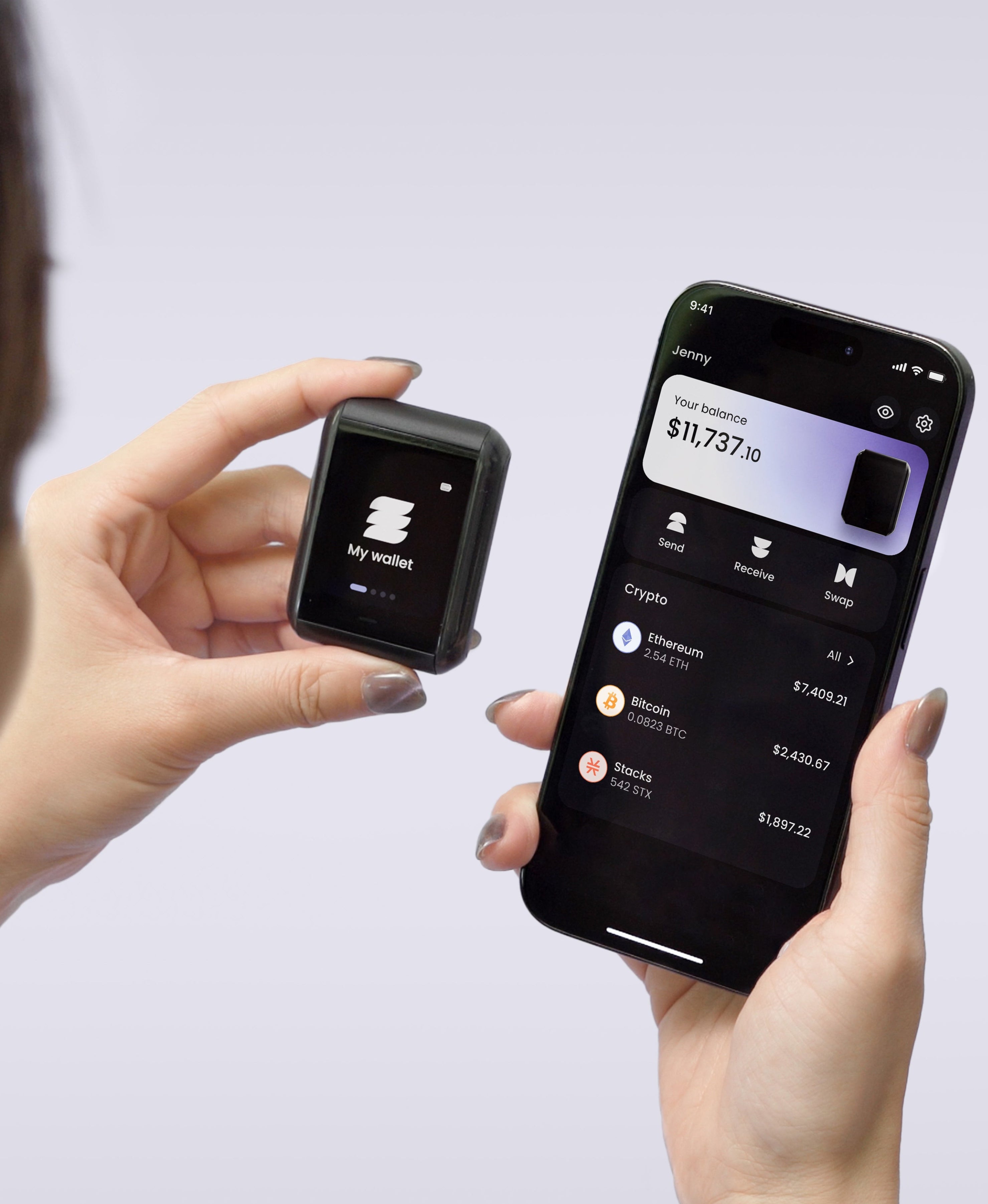
A phone wallet takes custody away from the company and hands it to an operating system that browses the web, installs apps, and connects to networks you don't control. A hardware wallet narrows that exposure by keeping the key on a device with one job. On Ryder One the private key is generated inside an EAL6+ certified Infineon SLC38 secure element and never leaves it, every transaction is shown in readable detail on the 1.6-inch AMOLED touchscreen before approval, and the button that authorises a signature is wired directly to the secure element so no software path can sign on its own. Communication is NFC only, with no Bluetooth, no USB data transfer and no Wi-Fi, which leaves the device unreachable unless it's against your phone.
That last point matters for the step you're stuck on, since withdrawal mistakes usually start with a bad address rather than a bad password. Ryder One verifies receiving addresses on the device screen, which is the defence against clipboard-hijacking malware that swaps an address between the moment you copy it and the moment you paste it into an exchange form.
Once it lands: the backup you now own
Completing the withdrawal transfers a responsibility along with the coins. No support line can restore access to a self-custodied wallet, which makes recovery something to settle before the balance gets large rather than after.
Writing a seed phrase on paper keeps it off every network and then leaves it vulnerable to water, fire, and a decade of moving house. Stamping the words into steel handles those hazards and still rests your whole position on one object surviving and staying hidden, which improves the odds without changing the structure underneath. TapSafe Recovery was designed to remove that single point of failure: half of what a restore needs sits on the Recovery Tag, half travels with your paired phone, held encrypted in your own iCloud or Google Drive rather than on the handset. Neither half gives up anything usable alone, and together they rebuild the wallet. Recovery Contacts are optional, hold a quarter share each, and can see no balances or addresses at any stage. The phrase itself stays available on the device as a last resort under the BIP-39 standard, so you're never tied to Ryder hardware.
The short version
If the withdrawal won't go, whitelist the address first, then check whether a 24-hour lock is holding it, then confirm the network matches the one your receiving wallet gave you. Those three cover the overwhelming majority of blocked transfers on Crypto.com. The friction is mostly the exchange protecting an account it still controls, and it disappears the moment the coins finish moving to keys that are yours.
Ryder One is 149 USD for the Starter Combo and 179 USD for the Super Safe Combo, with a Recovery Tag, wireless charger and pouch in the box. The firmware has been audited by Halborn, with the full report public, and setup runs about 60 seconds across three NFC taps.


Share: