

How does a hardware wallet work? The first time someone explains it, the answer usually stops at "it keeps your keys offline." That's true, but it's not enough to know what you're buying or why one device is worth $50 and another is worth $250. The difference comes down to what's happening inside the device.
This is a tour of the physical and software layers that turn a small piece of hardware into something a thief can't crack with a stolen laptop and a few hours.
The job of a hardware wallet
A hardware wallet does one thing well: it holds your private keys somewhere your computer can't read them, and signs transactions on demand without ever exposing those keys to the outside world.
Software wallets store keys on a phone or computer. Anything that infects the host (malware, a malicious browser extension, a remote access tool) can read those keys. A hardware wallet moves the keys onto a separate piece of hardware that doesn't run apps, doesn't browse the web, and doesn't speak to anything except a narrow signing protocol.
When you "send crypto" from a hardware wallet, what really happens is:
- The connected app on your phone or laptop builds an unsigned transaction.
- It sends that transaction to the hardware wallet over USB, Bluetooth, or NFC.
- The hardware wallet shows you the destination and amount on its own screen.
- You confirm.
- The hardware wallet signs the transaction internally and sends back the signed bytes.
- The connected app broadcasts the signed transaction to the blockchain.
The keys never leave the device. That's the whole product.
The secure element
The component that does the heavy lifting is called a secure element. It's a tamper-resistant chip designed for storing secrets and performing cryptographic operations.
Secure elements come from a small set of vendors. Infineon, NXP, and STMicroelectronics make most of the chips in the category. Each chip is rated against the Common Criteria certification standard, which runs from EAL1 (basic) up to EAL7 (formally verified). EAL5+ and EAL6+ are the levels you'll see on bank cards, passports, and the better hardware wallets.
What does the rating buy you? A few things:
- Side-channel resistance. A chip without it can leak the private key by varying its power draw or electromagnetic emissions during signing. EAL5+ and above are tested against these attacks.
- Fault injection resistance. Sophisticated attackers will flip bits inside the chip by hitting it with a laser, voltage glitch, or clock manipulation. Higher EAL ratings include hardware countermeasures.
- Tamper response. If somebody tries to physically open the chip, it self-destructs the keys before they can be extracted.
If a hardware wallet uses a generic microcontroller instead of a certified secure element, it's relying on software to do work the chip should be doing in silicon. Some good wallets work that way. The trade-off is that physical attacks become cheaper.
Ryder One uses an EAL6+ Infineon secure element, the same class of chip used in chip-and-pin payment cards.
How the device handles your seed
When you set up a hardware wallet, the device generates a seed phrase (typically 24 words) inside the secure element. The seed phrase is a human-readable encoding of the master key from which every private key on every blockchain you touch is derived.
The seed never leaves the secure element in plaintext. When you back it up, you write down the words. When the device signs a transaction, it derives the relevant private key from the seed in-place inside the chip.
This matters because it means the host computer (and anyone who controls it) can't recover the seed by reading the device's storage. The only path to the seed is the words you wrote down.
The screen and the buttons
The screen is a security feature, not a UI nicety. It's the only display in the signing flow that the host computer can't tamper with.
When the host sends an unsigned transaction to the device, the device parses it and shows you the destination address and amount on its own screen. If a piece of malware on your laptop swapped the address mid-flight, the address on the laptop screen will match the malware's wallet, but the address on the hardware wallet's screen will show the real destination. You compare the two before approving.
This is what separates a hardware wallet from a hot wallet that "stores keys offline." A hot wallet on an offline machine still trusts the screen and keyboard of that machine. A hardware wallet trusts only its own screen.
A few caveats:
- Tiny screens make address comparison painful. People skip the check, defeating the protection. A larger screen is a security feature.
- If the device only shows the first and last few characters of an address, an attacker can craft a wallet that matches both. Always confirm middle characters too.
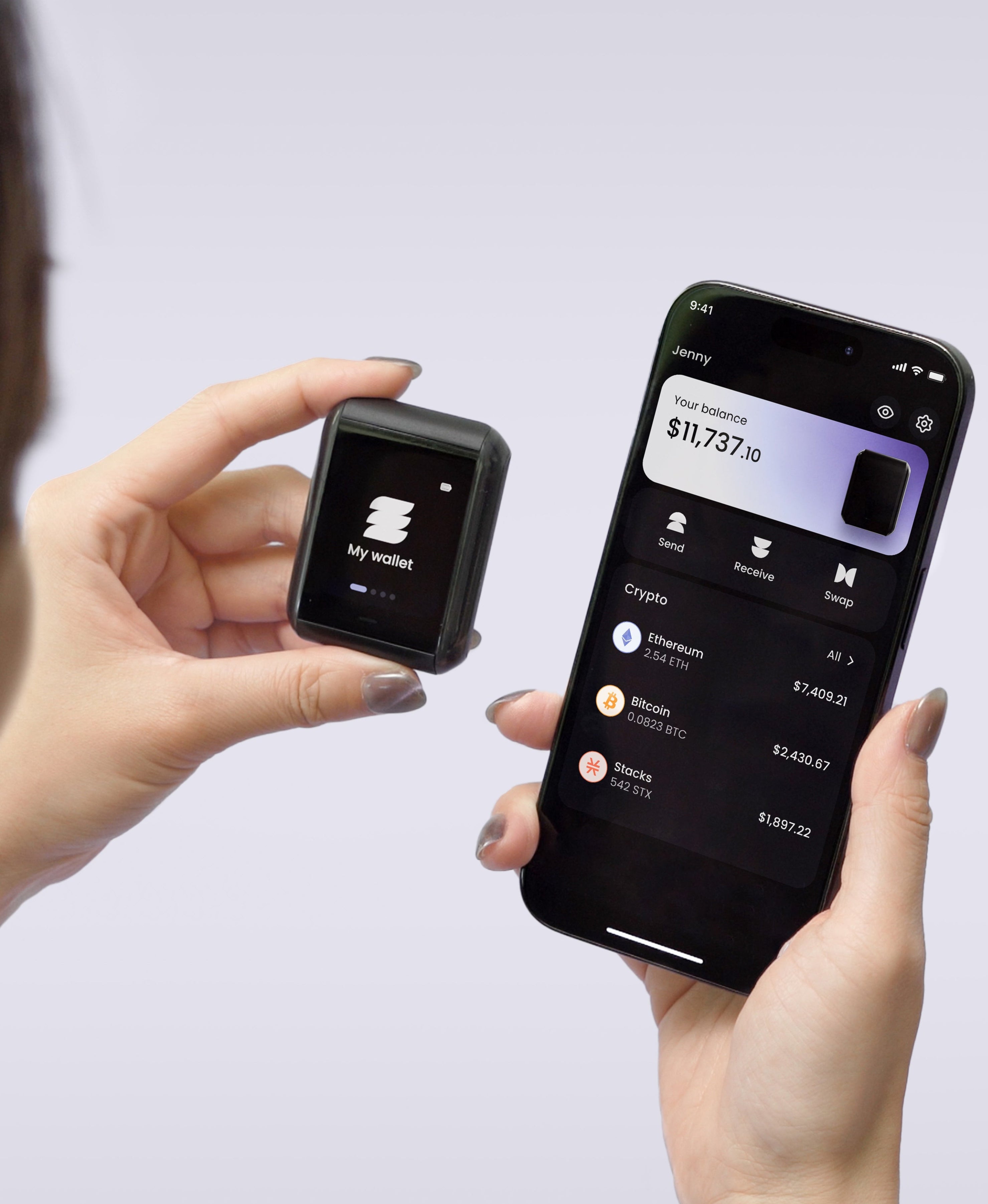
Ryder One uses a 1.6-inch AMOLED touchscreen for this reason, with the full address rendered legibly.
How it talks to the outside world
Hardware wallets connect to phones and laptops through USB, Bluetooth, or NFC. Each has trade-offs.
USB is the oldest path. It works but creates physical wear, exposes the device to whatever the host computer is running, and limits the device to working with computers that have ports.
Bluetooth untethers the device from a port but introduces an over-the-air attack surface. Bluetooth pairing flaws have hit major wallets in the past. The seed itself is still safe (the secure element doesn't expose it over Bluetooth), but transaction tampering attacks become a larger concern.
NFC is contact-only and contactless: the device only communicates when held within a few centimeters of the phone. There's no persistent radio link to attack and there's no port to wear out, or chance of plugging in your wallet into a compromised device.
Ryder One is NFC-only. We picked NFC because the security model is the cleanest: no radio link sitting open in the background, no USB port to corrode, no battery to fail, and of course, safety.
What hardware wallets don't protect against
A hardware wallet defends the keys. It doesn't defend against:
- Phishing. If you sign a malicious transaction yourself, the wallet does what you asked.
- Lost backup. If you lose the seed phrase, the device's secure element won't help.
- Compromised setup. If the device was tampered with before reaching you, the keys can be known to an attacker. Buy direct from the manufacturer, not from third-party resellers.
- Address-poisoning attacks. If you copy a recipient address from a fake transaction in your history, the device will sign whatever address you confirm.
The hardware wallet is one layer. The other layers are how you set it up, how you back it up, and how careful you are at sign time.
Where backup fits
The seed phrase is the disaster-recovery story for the hardware wallet itself. If the device breaks, gets lost, or burns in a fire, you import the seed into a new wallet and your funds reappear.
Standard practice is to write the seed on paper, then upgrade to a stamped steel plate for fire and water resistance. The plate is more durable than paper, but it's still one piece of metal. Every backup hinges on that plate surviving every move, every break-in, and every disaster between today and the day you need it.
We built Ryder One to remove that single point of failure. TapSafe Recovery splits the wallet backup across a battery-free Recovery Tag, your phone, and an optional circle of Recovery Contacts. No single component on its own gives anyone access. The seed phrase is still on-device as a last resort, so you're never locked into our hardware.
The short version
A hardware wallet is a small computer that holds your keys, signs transactions on its own screen, and never lets the keys leave its certified chip. The quality of the device comes down to which chip it uses, how the screen verifies what you're signing, and how the device communicates with the outside world.
Once you understand those three layers, the difference between a $50 wallet and a $250 wallet stops looking like marketing and starts looking like a list of attack surfaces the cheaper one can't cover.
Ready to see how Ryder One handles all three? See how it works.


Share: