

Almost every guide on how to use a hardware wallet stops at the moment the box is empty and the words are written down. That is roughly forty minutes of your life. The next ten years are the part nobody writes about, and they are where holdings are lost, because the device does its job perfectly while the person holding it develops habits that quietly undo the point of owning one.
What the device is doing when you use it
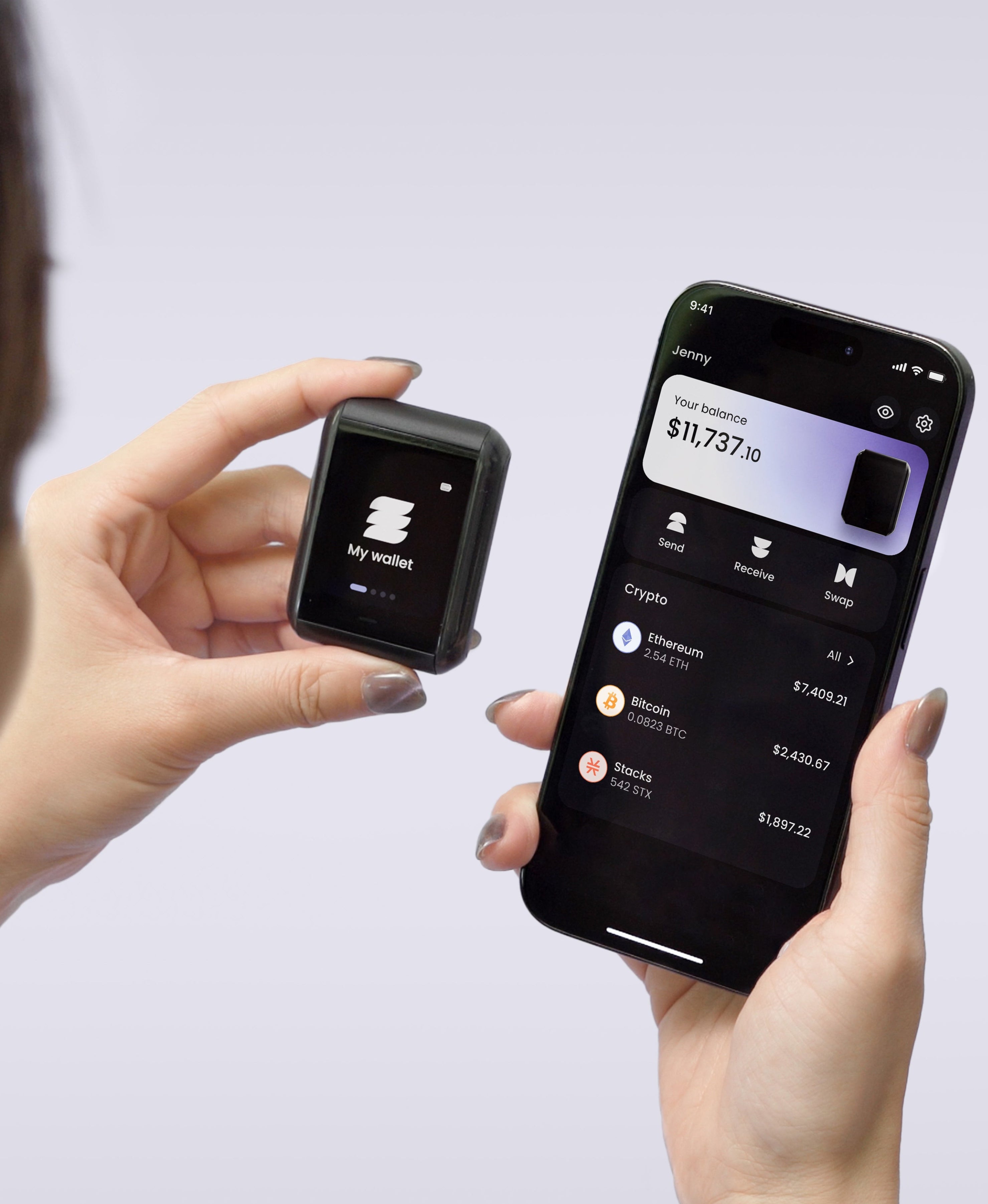
A hardware wallet holds one thing: a private key that never leaves the chip it was born in. Everything else you see, the balances, the token names, the price in dollars, comes from a companion app reading a public blockchain. When you send funds, the app builds a transaction, hands it over for a signature, and the device signs it after you approve.
So the app is a screen and a courier. It can lie to you, be replaced by a convincing copy, or be hijacked by something else running on your phone, and none of that reaches your keys. What it can do is change what you think you are approving, which is why every habit below comes back to one idea: believe the small screen in your hand over the big one on your desk.
Receiving: read the address off the device
Address substitution is the least dramatic attack in crypto and among the most effective. Malware watches your clipboard, notices something that looks like a wallet address, and swaps it for the attacker's. You paste, you send, and the chain does exactly what you told it to.
The defence takes four seconds. When you generate a receiving address, display it on the device itself and compare it against what the app is showing before you hand it to anyone. On the Ryder One, receive-address verification runs on the 1.6-inch AMOLED touchscreen for this reason, and the on-device address book means the destinations you reuse are already there to check against rather than being pasted in fresh each time.
Sending: the screen is the source of truth
The same rule works harder in the other direction. Before you press the button, the amount, the destination and the network on the device screen should match what you intended, and if the device shows you something the app didn't, the device is right.
This is what people mean by blind signing. A wallet that can only tell you "sign this" without rendering what "this" contains is asking you to trust a machine you can't inspect. Ryder One renders the transaction in readable detail before anything is committed, and the button that authorises the signature is wired directly to the EAL6+ Infineon SLC38 secure element, so no software path can produce a signature without a finger on it. Watch the fee line too: unusual network fees are often the first sign that a transaction isn't what you were told it was.
The approvals you granted and forgot
If you touch DeFi at all, you have granted token allowances, and allowances persist. A permission you gave a marketplace in 2024 sits there until you revoke it, and the contract holding it can be exploited long after you stop thinking about the site.
CertiK's Hack3d report for the first half of 2026 puts 1.31 billion dollars of losses across 344 incidents, with wallet compromise the costliest category at over 444 million dollars from just 33 incidents and phishing second at 366.3 million across 63. Very little of that came from broken cryptography. It came from people approving things.
Once a quarter, open an approval checker for each chain you use and revoke what you no longer need, beginning with anything unlimited. It takes ten minutes and it is the highest-value maintenance in self-custody.
Firmware updates are part of using the device
Updating feels like the risky moment, so plenty of owners skip it for years. The Coldcard episode in 2026 is the argument against that instinct: a build configuration change shipped back in March 2021 caused affected devices to generate seeds from a software random number generator instead of the hardware source, and attackers who worked it out drained roughly 1,367 BTC, close to 89 million dollars, from 4,585 addresses before the waves stopped. Nobody touched those devices. The flaw had been sitting inside them for five years.
Update from the vendor's own app, never from a link in an email, and read the release notes. Firmware is the one part of a wallet you cannot audit yourself, which makes the vendor's track record of publishing audits part of what you are buying. Ours is public at Halborn.
Backup is a separate discipline from daily use
Here is where the two halves of ownership separate. Using the device well protects you against attackers; backing it up well protects you against yourself, against fires, and against the day somebody else has to work out what you left behind.
Paper is where most people start and it burns, fades and gets thrown out by a well-meaning relative. Stamped metal is the standard upgrade and will survive a house fire, though your security then rests on one object staying intact and unread for decades, which is a single point of failure wearing better armour. TapSafe Recovery removes the single object: a Recovery Tag holds half of what recovery requires, your paired phone holds the other half encrypted into your own iCloud or Google Drive, and optional Recovery Contacts hold a quarter each without seeing anything about your holdings. Two pieces have to meet before anything opens. The seed phrase is still there on the device as a last resort under the BIP-39 standard, so you are never locked to our hardware.
A rhythm you can keep
Monthly, open the app and confirm your balances read as expected. Quarterly, revoke stale approvals, check for a firmware release, and confirm you can still find every piece of your recovery setup. Once a year, run the harder test: could the person you would want to inherit this work out what to do, using only what you have left them?
Most owners can answer the first two questions without much trouble and then stall completely on the third, because the honest answer involves a drawer, a hope, and a set of words nobody else has ever seen. That gap between using a device well and leaving something recoverable behind is the reason we built recovery the way we did. Get your Ryder One.
Meta description: How to use a hardware wallet after setup: verifying addresses on-device, reading what you sign, revoking stale approvals, firmware updates, and backup that lasts.


Share: