

If your crypto life happens on your phone, a hardware wallet built around a desktop application is going to sit unused in a drawer. That part is easy to work out. The harder questions arrive after you have decided to go phone-first, and they are the ones almost no product page answers: how the device talks to a phone, what changes when you replace that phone, and what you are carrying through an airport.
A hardware wallet for iPhone or Android is not one category. Four connection designs exist, they behave differently on each operating system, and the difference shows up in daily use rather than in the specifications.
How the device reaches your phone
NFC works by holding the wallet against the handset. No cable, no pairing, no radio sitting active in your pocket. The catch is that you need to find the phone's NFC coil, which is near the top on most iPhones and varies across Android models, and a case that is thick or metal can interfere.
Cable is the oldest design and the most awkward on mobile. On Android you are generally using USB OTG and it works. On iPhone you may need an adapter, and whether a given wallet supports a direct wired connection to a phone at all is worth confirming rather than assuming.
Bluetooth gives you range and convenience, and it adds a radio that is part of your threat model whenever it is on. Some people are fine with that trade and some are not; the point is to make it deliberately.
QR code and air-gapped designs pass transactions by showing codes to a camera, with no electrical connection at all. The most isolated option, and the slowest, which suits people who sign a few times a year.
On iPhone specifically, Apple's control over NFC and peripheral access has historically shaped what wallet apps can do, so a device that works beautifully on Android is not automatically the same experience on iOS. Check the vendor's own iOS support page and the App Store reviews from the last few months rather than a comparison article from two years ago.
Check your coins before anything else
This outranks every connectivity question, because a wallet that does not hold your assets is the wrong wallet regardless of how nicely it taps.
List everything you hold, including the small positions, and check each against the manufacturer's own asset list. Watch the difference between what a device signs natively and what its companion app reaches through third-party integrations, since a headline number in the thousands usually describes the second thing.
Ours, stated plainly: the Ryder One supports Bitcoin, Ethereum, Solana, and a growing list of top ERC-20 and SPL tokens, and it does not support XRP or Tron. Check your own holdings against our live list before ordering.
What happens when you replace your phone
Here is the question nobody asks before buying and everybody hits within two years. Phones get upgraded, lost, dropped in water, and stolen. If your hardware wallet is paired to one, you need to know what that event costs you.
For most phone-connected wallets the answer is reassuring: the keys are in the device, not the handset, so a new phone means reinstalling the app and pairing again. Your crypto was never on the phone.
The question gets sharper when the phone holds part of your backup. Ask the vendor directly whether any recovery material lives on the handset, and if so whether it is stored on the device itself or encrypted into your own cloud account. Those two answers behave completely differently when a phone goes into a river.
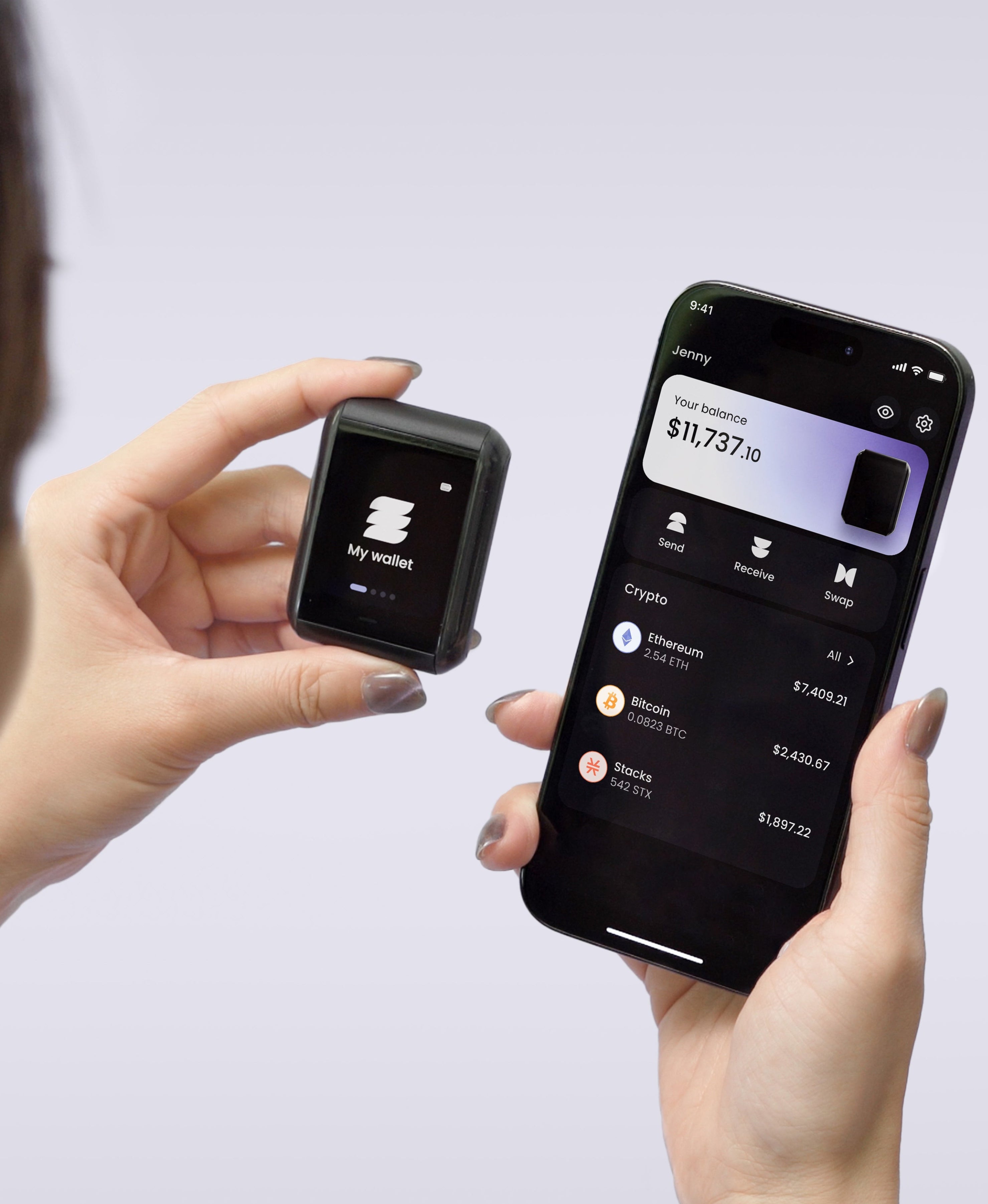
On a Ryder One, your paired phone holds half of the TapSafe recovery, and it is encrypted into your own iCloud or Google Drive rather than sitting on the handset, so losing the phone does not lose the share. Pairing a new phone is a tap, and the Recovery Tag holds the other half.
Travelling with it
The practical appeal of a phone-first wallet is that a trip needs no laptop. A small NFC device and your phone cover everything, which matters if you are away for a month.
A few things worth planning. Carry the device itself rather than packing it, because checked luggage gets lost. Decide before you leave whether your recovery material travels with you or stays home, and the general answer is that it stays home, since carrying the wallet and the means to rebuild it in the same bag defeats the arrangement. If you have more than one Recovery Tag, leaving one behind is the cleaner version of this.
Charging is the mundane one that catches people out. A device with a battery needs power, so check what it uses before you pack. The Ryder One charges wirelessly over Qi with a charger in the box, and a flat one still operates while sitting on that charger, which means a dead battery abroad is a delay rather than a problem.
What the screen has to do
The reason a hardware wallet is safer than a wallet app on the same phone is that it verifies transactions somewhere the phone cannot reach. That only holds if you can read what you are approving.
Check what the device shows you when a transaction comes in. A readable destination address, an amount, and a plain description is the standard worth insisting on. A device that displays raw data and a confirm button has handed the decision back to you without the information, and the chip certification does not change that.
This is also the defence against clipboard malware that swaps a destination address between copy and paste. On a Ryder One, every transaction renders in full detail on the 1.6-inch AMOLED touchscreen before you confirm, receive addresses are verified on the device itself, and the confirmation button is wired directly to the secure element so nothing in software can approve a transaction on its own.
What your backup has to survive, and where TapSafe differs
Phone-first or not, the backup is the part carrying your wallet. The standard arrangement gives you twelve or twenty-four words to keep intact and secret for as long as you hold crypto, and steel plates upgrade the fire resistance without changing the shape: one object still rebuilds everything, so it has to survive every accident and be found by nobody.
TapSafe Recovery splits that instead, using a Shamir's Secret Sharing implementation we wrote. The Recovery Tag holds half, your paired phone holds the other half encrypted into your own cloud, and optional Recovery Contacts hold a quarter each while learning nothing about what you own. No single share opens the wallet. Your seed phrase stays available on the device as a last resort under the BIP-39 standard, so other hardware remains an option.
The limit worth knowing before you order
Phone-first is a commitment, and ours is a firm one. The Ryder One speaks NFC only: no Bluetooth radio, no Wi-Fi, no wired data port. Setup and signing both run from your phone, in three taps and under a minute.
The flip side is that we currently have no desktop plugin and no browser-extension bridge, so if any part of your routine involves signing inside a desktop wallet or a browser extension, that is a mismatch to weigh now rather than after delivery. It is 149 USD for the Starter Combo and 179 USD for the Super Safe Combo, and Halborn audited the firmware independently with the report public.
If your phone is where your crypto lives, buy for the way you already use it. Get your Ryder One.


Share: