


Key Takeaways
Your private keys stay offline with both wallets. The difference is how they handle backup and recovery.
- Ryder One backs up your wallet with a single tap during setup using TapSafe Recovery. No seed phrase to write down, no PIN to remember, and no single backup that gives access to your wallet if found.
- Trezor Safe 7 follows the traditional seed phrase recovery model with a large 2.5-inch touchscreen and broad ecosystem support. If you prefer a bigger screen and are comfortable managing a written backup, Trezor built it for that.
- Ryder One is priced at $229 with a Recovery Tag, wireless charger, and travel pouch included. Trezor Safe 7 is priced at $249 with a charging cable and a recovery sheet.
Choosing a hardware wallet comes down to one question more than any other: what happens when something goes wrong?
You may lose your device, forget where you stored your backup, or simply make a mistake under pressure. How a wallet handles that moment is what separates good security from a false sense of it.
This article walks through where they differ, where they overlap, and what those trade-offs actually mean in practice. We built Ryder One, so we're not neutral. But we've done our best to lay this out honestly, because the right wallet is the one that fits how you actually live.
High-Level Comparison
Trezor Safe 7 is Trezor's flagship device, built for users who prefer a larger screen and are comfortable with a traditional self-custody flow. It features an aluminum body, a 2.5-inch touchscreen with haptic feedback, dual secure elements including post-quantum firmware verification, and wireless charging. If you want a bigger display and a traditional recovery model, Trezor built it.
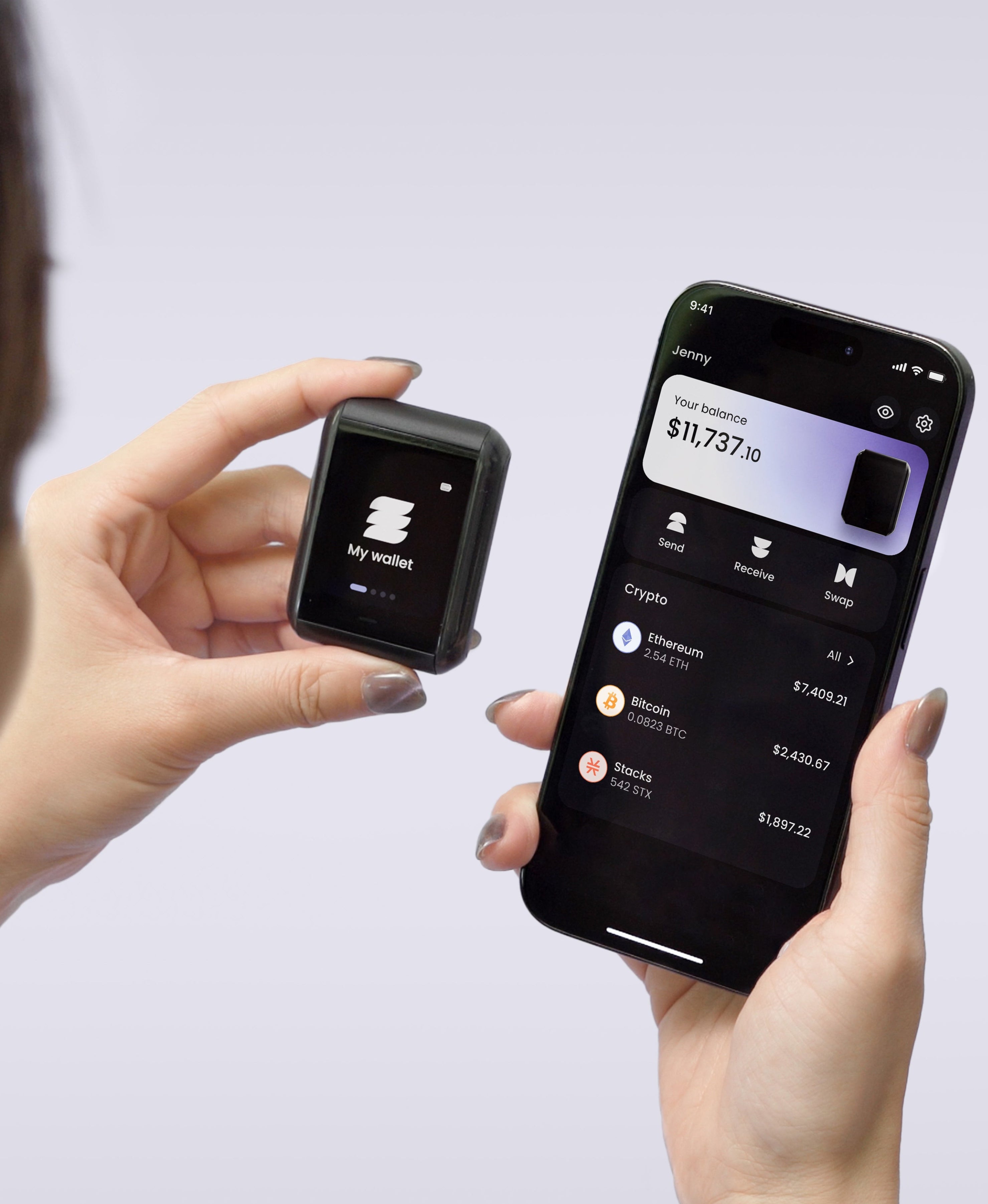
Ryder One is a portless, NFC-only hardware wallet that sets up in under a minute and includes TapSafe Recovery. It's built for people who don't want the stress of protecting a written seed phrase for the rest of their lives while still being able to access it if they ever need to.
Both keep your private keys offline on a certified secure element. The differences are in how you set up, how you recover, and what trade-offs you're willing to make. Let's walk through them.
The Biggest Differences
Wallet Recovery
This is the part that matters most, and it's where the two wallets diverge most sharply. Ryder One uses the BIP-39 standard while Trezor Safe 7 uses the SLIP-39 standard. Both wallets generate a seed phrase that can be used to restore your wallet. The difference is in what that means for your day-to-day life and what happens when things go wrong.
Trezor Safe 7 Relies on a Written Backup
With Trezor Safe 7, the written backup is everything. During setup you write down 20 words on the included recovery sheet and store them somewhere safe. That piece of paper is your only path back in if your device is ever lost, damaged, or erased. Trezor is transparent about this: lose the backup, lose the wallet.
It works, and it's familiar. But it also creates the same burden many people struggle with: you now have to safely store a piece of paper forever. Over 3 million Bitcoin have been lost globally due to seed phrase mismanagement. Not because of hacks. Because of paper. A piece of paper stored in a place someone forgot, damaged in a flood, or found by the wrong person.
Trezor acknowledges this problem themselves. They sell the Trezor Keep Metal, a steel tube that stores your 20-word backup on engraved metal plates designed to survive fire and water. It's a smart product, but it costs $99 on top of the $249 device, and it's not included in the box. If you want your Trezor backup to be physically durable, that's an extra purchase you need to make after the fact. With Ryder One, the Recovery Tag is waterproof, dustproof, and included from day one.
It's also worth noting that Trezor's SLIP-39 standard means only SLIP-39 compatible wallets can restore your seed phrase, and right now that's only Trezor. If you ever want to switch hardware wallet brands, you'll need to manually move your funds across rather than simply importing your seed phrase.
 Trezor's recovery process on paper
Trezor's Multi-share Backup: Better, But Still Paper
Trezor recently introduced Multi-share Backup, a more advanced recovery option that splits your backup into multiple word lists using Shamir's Secret Sharing, the same principle behind Ryder's TapSafe. You set a threshold — say, any 3 of 5 shares — then distribute them across different locations. If you lose one, the others still work. It's a genuine improvement over a single piece of paper, and worth acknowledging honestly.
But here's what the setup actually looks like in practice. Let's say you choose a 3-of-5 configuration. You now need to write down five separate 20-word lists — that's 100 words total. Each list needs to be transcribed correctly, verified on the device word by word, and then physically stored in a different secure location. You need to cross-reference that each share is in the right order and that none of your lists contain errors. One mistake in transcription and a share is compromised. One forgotten storage location and your redundancy drops.
This isn't a feature most users will ever set up, because the default flow still hands you a single 20-word sheet during setup. Multi-share Backup is opt-in and requires deliberate configuration after the fact. The users who need it most — the ones who aren't great at managing paper — are the least likely to go through the process of setting it up.
Ryder One Relies on TapSafe and Understands Human Error
Ryder One was designed around one insight: most people won't perfectly manage a paper backup for five or ten years. They'll forget where they put it, store it somewhere obvious, or make a mistake writing it down. With Ryder One, that burden is gone entirely.
During setup, your wallet is backed up with a simple tap. No writing, no PIN code, no choosing where to hide a piece of paper. Your recovery is spread across a Recovery Tag, your phone, and optionally Recovery Contacts, using a custom implementation of Shamir's Secret Sharing. No single component holds enough information to access your wallet on its own, so there's no single point of failure and nothing worth stealing individually.
Your Recovery Tags should be stored in safe locations, but unlike a seed phrase, a tag on its own is useless to anyone who finds it. There is no sequence to memorize, no words to copy correctly, and no PIN to forget. And if you ever need your seed phrase directly, it's always accessible on the device. You're just never forced to depend on it.
With Ryder's newest update, you can also import your seed phrase from a different wallet and layer it with TapSafe technology on your Ryder One.
This recovery method is called TapSafe, built on a custom implementation of Shamir's Secret Sharing. Here is how TapSafe works in detail.
The honest summary: Trezor Safe 7 takes the traditional backup model and builds the best version of it. Ryder One replaces the traditional model while keeping the seed phrase available as a last resort. With TapSafe, distributed recovery isn't a feature you configure later. It's the default from the moment you start.
 Ryder's recovery process on NFC tag (TapSafe)
Here's a table that summarizes the key differences between these recovery approaches:
The Set Up
Ryder One setup takes around 60 seconds. You tap the device on your phone, the Ryder App walks you through wallet creation, and TapSafe Recovery is configured with the included Recovery Tag. No desktop software, no writing, no extra purchases needed. Most people find it surprisingly fast the first time. It feels less like setting up a security device and more like pairing a new set of headphones.
Trezor Safe 7 setup takes around 15 minutes. You connect the device, install firmware, authenticate it, create the wallet, write down your 20-word backup, verify each word in order, and set a PIN. For an experienced crypto user this is a familiar flow. For newcomers, it involves a level of technical experience that can feel intimidating, particularly the moment where you're asked to write down twenty words that represent the keys to your net worth.
Here's a side-by-side video showing the setup of both wallets. Ryder One completes setup at 1 minute 36 seconds while Trezor Safe 7 keeps going.
That difference isn't just about speed. It's about how the experience makes you feel. One asks you to be careful, precise, and organized from the very first moment. The other just works.
Where They're the Same: Security Architecture
Both wallets use certified secure element chips to store private keys and perform cryptographic operations in isolation from the rest of the system. Trezor Safe 7 uses dual secure elements, including the TROPIC01 chip and an additional EAL6+ certified element, and is the first hardware wallet to support post-quantum firmware verification. Ryder One uses an EAL6+ certified Infineon SLC38 chip. Both wallets ensure private keys never leave the device and are never exposed to your phone or computer.
Ryder One's security has been externally audited by Halborn, a top blockchain security firm trusted by the largest financial institutions. You can read the full audit report on our website. Trezor takes a different approach to transparency: the TROPIC01 chip is fully open source, meaning anyone can inspect and verify how it works without restriction. Both approaches are legitimate. One relies on independent expert review, the other on open community auditing.
Both wallets require physical confirmation of every transaction on the device before anything is signed. What you see on the device screen is what you are signing. Neither wallet cuts corners here.
So when people ask, "which one is more secure?", the better question is: secure against what kind of failure?
Trezor Safe 7 is optimized for people who are happy taking full responsibility for a traditional written backup. Ryder One is optimized for people who believe the biggest real-world failure in self-custody isn't the chip — it's the human experience around setup and recovery.
Where They Differ
Attack Surface
Security isn't only about the chip inside the device. It's also about every path that leads to it. The two wallets take opposite approaches here.
Ryder One is portless and fully air-gapped. No USB, no Bluetooth, no Wi-Fi. Every interaction happens via NFC, which only activates within a few centimeters of a paired device. The thinking is straightforward: fewer interfaces means fewer things to secure, monitor, and worry about.
Trezor Safe 7 supports Bluetooth and USB-C. Trezor notes that Bluetooth can be disabled in settings if preferred, which is a thoughtful option. These connections give Safe 7 more flexibility across desktop and mobile setups. They also mean more interfaces are involved in normal use. Trezor has implemented security measures for each, but the trade-off between connectivity and attack surface is a real one worth understanding before you decide.
 Trezor has a USB-C port and Bluetooth connectivity while Ryder One is portless with sealed design and NFC-only connectivity
Ecosystem and Third-Party Support
This is where Trezor has a genuine advantage, and it's worth being straight about that.
Trezor Suite is available across desktop and mobile, and Safe 7 supports broad asset coverage and third-party wallet compatibility. If you need wide compatibility across many chains and existing crypto workflows, Trezor's ecosystem maturity is a real advantage.
Ryder One supports Bitcoin, Ethereum, Solana, Stacks, and all major tokens across the chains most people use, with new assets added regularly. The focus has been on building a secure, well-tested experience for mainstream assets rather than maximizing chain count. For most holders that's more than enough. For users with complex multi-chain portfolios, it's an honest limitation worth factoring in.
Daily Use
What's in the Box?
Opening the box already tells you something about each product's philosophy.
Ryder One includes the device, a Recovery Tag, a wireless charger and cable, and a travel pouch. The wireless charger works with your phone and other devices too, which is a small but genuinely useful detail. TapSafe Recovery is included at no additional cost. Extra Recovery Tags are available for $29 for a pack of two if you want more redundancy.
 Ryder One comes with a free wireless charger, Recovery Tag and a travel pouch
Trezor Safe 7 includes the device, a charging cable, and a recovery sheet for writing down your 20-word backup. It's a box designed around the classic hardware wallet model: the device and the paper-based recovery process that comes with it.
Trezor prepares you for a pen and paper. Ryder prepares you for a tap.
 Trezor Safe 7 comes with a charging cable, and a recovery sheet for writing down your 20-word backup.
Usability Takeaways
Ryder One is faster to set up, requires no writing, and everything you need is in the box from day one. The NFC-tap workflow feels natural if you're already used to contactless payments. For most people, the whole process takes under a minute and feels closer to setting up a new app than a security device.
Trezor Safe 7 takes longer to get started, particularly around the written backup. The hardware features a 2.5-inch touchscreen with haptic feedback, which gives you more screen real estate during setup and transaction verification. Once it's running, Trezor Suite is a capable platform. If you're already comfortable with hardware wallets, the setup won't feel like a barrier, it's just time-consuming.
Where the two experiences diverge most sharply is not in the routine moments, but in the ones that happen less often — like losing a device, recovering access, or setting up on a new phone. Those are the moments where setup philosophy and recovery design become real.
If I had to summarize the feeling in one line:
- Trezor Safe 7 feels like a serious device.
- Ryder One feels like self-custody redesigned to fit into your life.
 Trezor Safe 7 was designed for the traditional self-custody experience while Ryder One feels familiar with our day-to-day card payments
User Privacy
Both wallets can be purchased with varying levels of privacy and both accept cryptocurrency as payment. Ryder One's offline NFC-only architecture means fewer server connections during normal use. Trezor Suite connects to Trezor's infrastructure for balance information and firmware updates.
Neither wallet has experienced a hardware security compromise. Trezor has had reported vulnerabilities in older models that were addressed in the Safe series with the addition of a secure element. The Safe 7's dual secure element architecture represents a meaningful security improvement over previous Trezor generations.
Device Durability
Both wallets carry an IP67 rating for water and dust resistance, which puts them on equal footing for real-world durability. Trezor Safe 7 adds Gorilla Glass 3 on the display and an aluminum body while Ryder One uses an aluminum body with tempered glass. Both are built to survive.
The practical difference is form factor. Trezor Safe 7 is a larger, screen-forward device with a battery that needs occasional charging. Ryder One is more compact, charges wirelessly, and has no exposed ports. For users who want to carry their wallet daily, both hold up well. For users who want minimal maintenance, Ryder One's sealed design requires less attention over time.
Cost
Trezor Safe 7 is priced at $249 and includes the device, a charging cable, and a recovery sheet. Ryder One is priced at $229 and includes the device, a Recovery Tag, a wireless charger and cable, and a travel pouch.
The sticker prices are close, but at $20 less, Ryder One includes meaningfully more in the box: a wireless charger that doubles for your phone, a Recovery Tag that handles your backup, and a travel pouch. Trezor includes a cable and a sheet of paper.
Where the gap widens is in making your backup last. Trezor's included recovery sheet is paper — it won't survive a flood, a fire, or a careless moment. To upgrade to something durable, you'll need the Trezor Keep Metal at $99. If you're using Multi-share Backup with multiple shares, you'd ideally want one for each. With Ryder One, the Recovery Tag is waterproof and dustproof out of the box, and extra tags are $29 for a pack of two.
When you factor in what it actually costs to make each recovery model reliable over the long term, the comparison shifts in Ryder One's favor.
 Ryder One includes a waterproof Recovery Tag in the box. Trezor's durable backup costs $99 extra
Final Verdict: Who Should Buy Which?
Choosing between Ryder One and Trezor Safe 7 comes down to what kind of self-custody experience you actually want.
Choose Trezor Safe 7 if you want a larger screen, broad ecosystem support, and are comfortable managing a written backup (or setting up Multi-share Backup). It's a solid device for users who want full control over a traditional self-custody flow.
Choose Ryder One if you want a wallet that's easy to recover in case of loss, without depending on a single paper backup. Every transaction is a tap, everything you need is in the box, and there's nothing to write down, memorize, or pay for later.
Here's a table to make it easier for you to compare both devices:
Ready to Make Your Choice?
Ryder One makes self-custody simple and secure. Set up in 60 seconds, no seed phrase handling required, and everything you need is in the box. Learn more about TapSafe Recovery and get your Ryder One today.



Share: